
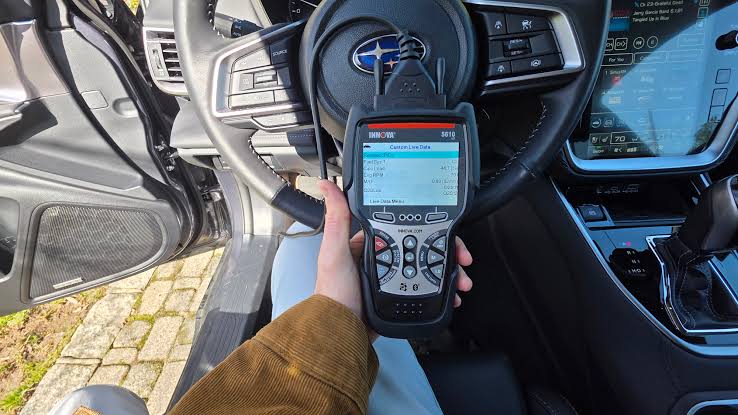
Stepping into car diagnostics can feel overwhelming at first, but an OBD2 scanner is a beginner’s best friend for understanding what is going on under the hood. These tools plug into your car’s onboard diagnostic port to read error codes, monitor performance, and even reset lights like the check engine warning. With cars getting more complex in 2025, a good scanner saves trips to the mechanic and helps you fix simple issues yourself. From reviewing top models on sites like Road & Track and Tom’s Guide, plus user feedback on forums, here is a straightforward guide to choosing one as a newbie. We will cover what to look for, types, and recommendations tailored for ease of use.
1. Understanding OBD2 Scanners and Their Basics
OBD2 stands for On-Board Diagnostics II, a system in cars made after 1996 that tracks engine health, emissions, and more. A scanner connects to the port under your dash, usually near the steering wheel, and pulls data via Bluetooth, Wi-Fi, or cable. For beginners, it translates codes like P0420 (catalyst issue) into plain English explanations. Why get one? It empowers you to spot problems early, like a faulty sensor, avoiding costly repairs. Models now pair with apps for real-time graphs of RPM, fuel trim, or oxygen levels, making learning fun and practical.
2. Key Features Beginners Should Prioritize
Focus on user-friendly traits to avoid frustration. Look for clear screens or app interfaces that explain codes without jargon. Bluetooth or Wi-Fi connectivity lets you use your phone for bigger displays and updates. Live data streaming shows real-time stats, helpful for troubleshooting rough idles. Compatibility is crucial; ensure it works with your car’s make, like Toyota or Honda, and supports OBD2 protocols. Battery-powered units are handy for quick checks without starting the engine. Free lifetime updates keep the software current for new codes in 2025 models. Avoid overkill features like bi-directional control unless you plan advanced work.
3. Types of OBD2 Scanners for New Users
Scanners come in three main categories. Basic code readers, under ₦10,000 to ₦20,000, just pull and clear codes, perfect for absolute beginners checking simple lights. Mid-range scan tools, ₦20,000 to ₦50,000, add live data and freeze frame info, showing what happened when the light came on. Advanced ones, ₦50,000+, include graphing, ABS/SRS diagnostics, and sometimes bi-directional tests like actuator control. For starters, mid-range strikes the balance, offering enough depth without complexity. Handheld units are standalone, while app-based ones need a smartphone but feel modern.
4. Budget-Friendly Picks Under ₦20,000
If you are just dipping in, start cheap but reliable. The Launch CR529, praised in Tom’s Guide for 2025, costs around ₦15,000 and reads/erases codes, shows live data, and checks emissions readiness. It is plug-and-play with a color screen, no app needed, ideal for quick driveway checks. Another solid choice is the Innova 5210 at ₦18,000, which includes battery tests and oil reset, with free updates. Users on Reddit note its durability for daily drivers. These keep things simple, focusing on core functions without overwhelming menus.
5. Mid-Range Options for Growing Confidence
Once comfortable, step up to tools like the Autel MaxiCOM MK808BT PRO, around ₦40,000, highlighted in YouTube reviews for beginners. It scans all systems, not just engine, with Bluetooth for wireless use, and supports oil/EPB resets. The app interface explains codes in detail, plus it graphs data for spotting trends like fuel pressure drops. The OBDLINK MX+ at ₦35,000, from GearJunkie tests, excels in custom PIDs for advanced monitoring, compatible with apps like Torque Pro. These build skills, letting you diagnose beyond basics, like ABS issues.
6. Advanced Scanners Worth Considering as You Learn
For those ready to dive deeper without pro prices, the Launch CRP919X, suggested on Reddit for 2025, hits ₦45,000 and offers bi-directional control, like testing solenoids. It covers 30+ resets and full-system scans, with a touchscreen for easy navigation. The XTOOL D7, another forum favorite at ₦50,000, adds key programming and ECU coding, great for multi-car households. These are beginner-friendly with tutorials in the app, but skip if you are not tinkering yet. They future-proof your setup as your knowledge grows.
7. How to Use Your New Scanner Effectively
Plug it in with the engine off, turn the key to “on” without starting, and follow prompts to scan. Note the codes, look them up in the tool or online, and clear after fixes. For live data, start the engine and watch values like coolant temp (should hit 90°C). Apps often have guides. Practice on a healthy car first to learn normals. Always disconnect properly to avoid battery drain.
8. Tips for Buying and Avoiding Pitfalls
Buy from trusted sellers like Jumia or auto parts shops to dodge fakes. Check reviews for your car model compatibility. Android/iOS support matters for app-based units. Warranty, at least one year, protects against defects. Avoid cheap no-names; they misread codes. Consider extras like cases for portability. In 2025, look for 5G-ready Bluetooth for faster data.
Choosing the right OBD2 scanner turns mystery lights into manageable fixes. Start basic, learn as you go, and your car stays reliable longer.