
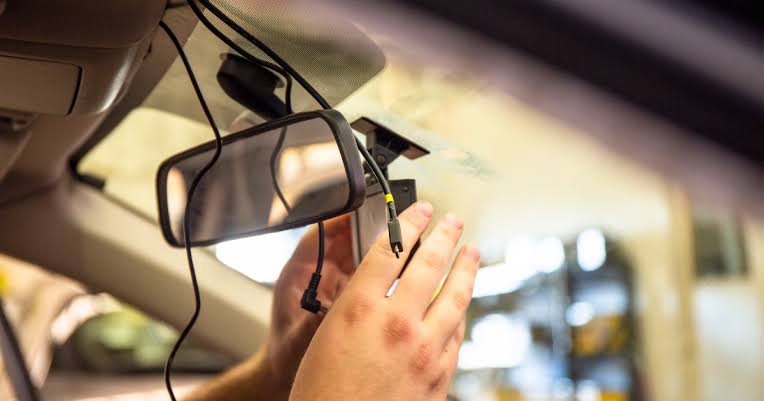
Installing a dash cam in your vehicle is one of the smartest upgrades you can make as a driver in Nigeria. With increasing traffic accidents, disputes over fault, hit-and-run cases, and the need for evidence during police stops or insurance claims, a dash cam provides peace of mind and real protection. The installation process is straightforward, takes 30–60 minutes for most people, and does not require cutting wires or visiting a mechanic if you choose a simple plug-in model. Here is a clear, step-by-step guide that covers everything you need to know in 2026 to get a clean, reliable setup that works perfectly on Nigerian roads.First, choose the right dash cam for your needs. Most people start with a single front-facing camera in 1080p or 2K resolution. Popular budget-friendly options in Nigeria right now include the 70mai A400, Xiaomi 70mai 1S, Vantrue N2 Pro (dual channel), Qubo Dash Cam Pro, and Tekcam FHD models, all priced between ₦25,000 and ₦50,000. Look for a Sony sensor for good night vision, wide-angle lens (130–170 degrees), G-sensor for impact detection, loop recording, and parking mode support. If you do ride-hailing or carry passengers, consider a dual-channel model with an interior camera. Buy from trusted sellers on Jumia, Konga, or verified local shops to avoid fakes that overheat or fail quickly.Gather your tools and accessories before starting. You will need the dash cam kit (camera, mount, power cable, adhesive pad), a plastic pry tool or credit card to tuck wires, zip ties or adhesive cable clips, and optionally a fuse tap kit if you want hardwired parking mode. A small flashlight helps when working under the dashboard. Park in a shaded area with the engine off and battery disconnected (negative terminal first) if you plan any hardwiring.Mount the camera in the optimal position. The best spot is behind the rearview mirror on the windshield, high enough not to block your view but low enough to avoid interference from the mirror. Clean the glass thoroughly with alcohol wipes to remove dust and grease for strong adhesion. Peel the protective film from the adhesive mount, press it firmly onto the windshield for 30–60 seconds, then attach the camera. Angle it slightly downward so the view includes the hood for reference and captures license plates clearly. Test the angle by sitting in the driver’s seat—make sure it covers the road ahead without glare from the dashboard.Route the power cable neatly. Most dash cams plug into the 12V cigarette lighter socket. Run the cable along the headliner (roof lining) from the camera to the A-pillar (the pillar next to the windshield). Use your fingers or the pry tool to tuck the cable under the headliner edge so it is hidden. Continue down the A-pillar, tucking behind the trim without blocking airbags. Bring the cable under the dashboard to the cigarette lighter. Secure loose sections with zip ties or adhesive clips so nothing dangles or interferes with driving. If the lighter socket is always on (some cars), the dash cam will stay powered even when the ignition is off—perfect for basic parking mode.For parking mode with motion or impact detection, hardwire the camera instead of using the lighter socket. This requires a fuse tap kit (₦5,000–₦10,000). Find a fuse box under the dashboard or near the driver’s side kick panel. Use the fuse diagram in your owner’s manual or online to locate an accessory fuse (one that turns off with the ignition) for normal power and a constant fuse (always on) for parking mode. Insert the fuse tap into the chosen fuse slots, connect the dash cam’s power wire to the tap, and ground the black wire to bare metal on the chassis. Tuck all wires neatly. This setup lets the camera record when parked but cuts off at low battery voltage to avoid draining your starter battery.Test the system thoroughly before finishing. Start the engine and confirm the camera powers on, records video, and saves files properly. Shake the car gently to trigger the G-sensor and check that the clip locks. Test parking mode if hardwired by turning off the ignition and tapping the car. Download the app (for models with Wi-Fi) and connect to view live footage and download clips. Check night vision in a dark area and make sure the date/time stamp is correct.Adjust settings for Nigerian conditions. Set loop recording to 3–5 minutes so old clips overwrite automatically. Enable G-sensor sensitivity to medium or high so impacts lock the footage. Turn on motion detection for parking mode if hardwired. Set resolution to 1080p or 2K and frame rate to 30 fps for clear license plates. Format the memory card in the camera every few months to prevent corruption.